Studio
Browse your schema as a diagram, and your rows through your own client
VibORM Studio is a local app for your database, read and written through the
VibORM client your project already has. It ships as its own package, so
viborm carries none of it:
npx @viborm/studio
# or, in the project: pnpm add -D @viborm/studio && pnpm viborm-studio
Its version follows viborm’s: install the release that matches yours.
Finding your config
Run it anywhere in the project. It looks for viborm.config.ts (or .mts,
.js, .mjs) in the working directory, then in each parent directory up to
the repository root. Without one, it searches below the working directory for
a file that imports defineConfig from "viborm/config", skipping
node_modules, build output and hidden folders: in a monorepo, run from the
root, it opens apps/api/viborm.config.ts. It names any other config it found;
--config <path> opens one of them instead.
The config loads as every viborm command loads it: the project’s .env,
then the client its config exports. Relative paths in it (a SQLite file, say)
read from the config’s own directory.
An embedded database opens in the studio’s own process. With PGlite, give the
client a dataDir (createClient({ schema, dataDir: "./pglite-data" })):
without one, the studio opens an empty in-memory database, not your
application’s. And stop your application before you open the studio on the
same dataDir: PGlite serves one process, and two processes on one data
directory can corrupt it.
What it shows
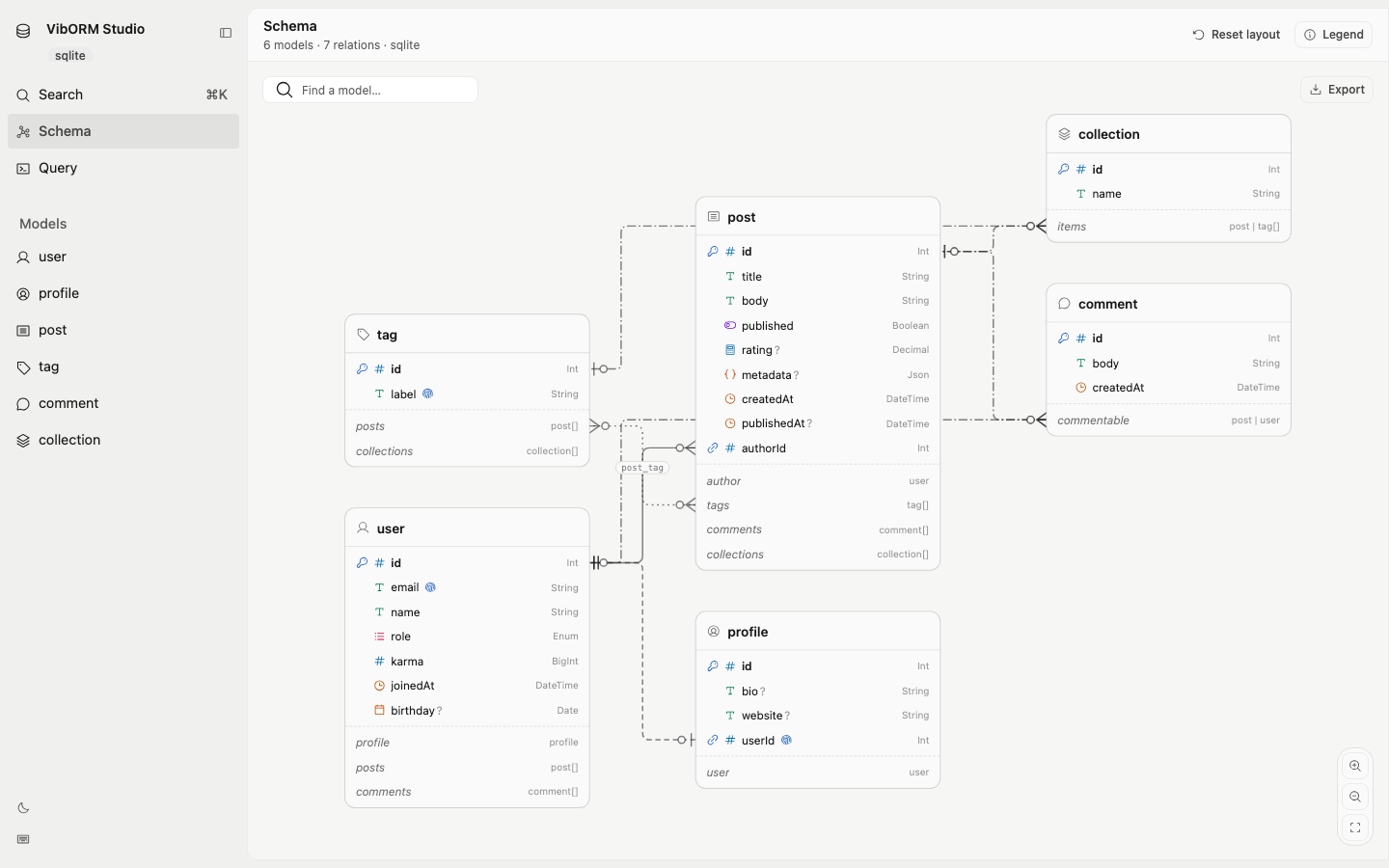
- The schema: each model’s columns with their types, nullability,
primary and unique keys, and each relation as a line between the columns
that store it, its ends in crow’s foot notation. One-to-one, one-to-many,
many-to-many (with its junction table) and polymorphic relations each have
their own line. Models that join each other stand together, and the groups
joined most sit side by side. Click a model and its relations light up while
the rest fades; click one of its relations and the models it reaches stand
out. Find a model by name, move cards by hand (they stay where you leave
them; Reset layout lays the diagram out again),
and export the diagram as PNG or SVG. Each model gets an icon guessed from
its name (
invoicea receipt,apiKeya key,teamMemberpeople,pull_requestsa pull request), else from its shape (a row joining two others, an email and a password); on the schemas of open-source applications, more than nineteen names in twenty get one. - Rows: a page at a time, searched in their text columns, filtered by
conditions and groups of them, each group matching all, any or none of
its conditions (AND, OR, NOT, nested), sorted by any column. A condition reads a
column of the model or of a related model (some, every or no related row,
through a to-many relation), and its value is picked by type: a calendar, a
time, a number, a choice. An “Aa” toggle on the search and on each text
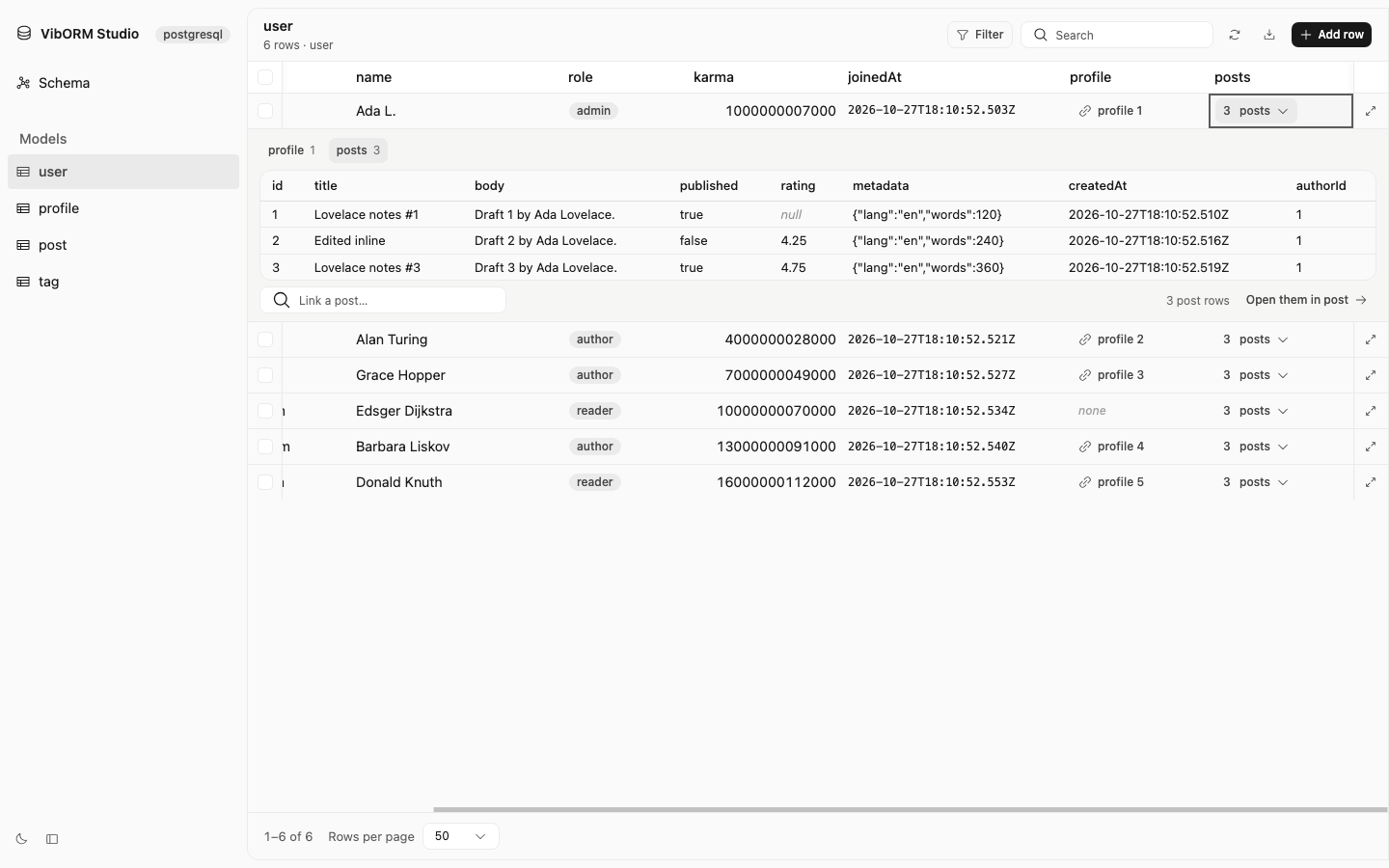
condition ignores case. Columns are hidden, moved, resized and pinned. A relation’s cell
opens the related rows under the row; from there, open them all in their
own table. Polymorphic relations are followed too: a to-one says the variant
it reached (
video 1) and opens that row, a collection opens one variant at a time, and a target’s inverse lists only its own variant’s rows. - Saved views: a model’s table as you left it (its filter, search, order,
page size and columns: which show, in which order, how wide, which are
pinned) saved under a name and listed in the sidebar. An open view shows
when it no longer matches the table, and is saved again, renamed or copied
from the same button; a view’s menu in the sidebar changes its icon (found
by name or by what it stands for:
money,team) or deletes it. The studio keeps views and the diagram’s layout per project, in~/.viborm/studio: the same whichever port or browser opens it. - Editing: a cell is edited in place with an editor of its type (a switch for a boolean, a calendar for a date, a date and a time for an instant, a select for an enum), a row is opened in a drawer, a new row is added there, rows are selected and deleted. A foreign key is picked from the rows it can point to, and a to-many relation links or unlinks a row through the client’s nested writes, polymorphic relations included (the variant chosen first when the relation has several). A link or unlink waiting to be saved shows as a row of the related table.
- Changes are stacked, then saved together: nothing is written as you edit. Changed cells, rows to add and rows to delete show in the table, and a bar counts them: review them (and drop any one), discard them all, or save them. A save writes every change in one transaction of your client: all of them, or none, and a refused one is named with the client’s message. The stack survives a reload of the page. ⌘S saves, ⌘Z drops the last change.
- Query: a read built with pickers, no JSON to write. Find rows (the table’s own conditions, through relations too, an order, a page, the columns and related rows to return), find one by a unique column, count them, or compute counts, sums, averages and extremes over them or per group. It runs through your client as you build it; the page shows the rows as a table (sorted in place, the related rows read with them opening under their row, as deep as the read went; computed values as cards or a column each), the JSON, the SQL it ran, its trace and the call to write in your application, and opens the rows it found in their table. The trace is what your instrumentation’s tracer would receive: each span (the operation, each statement inside it) on a waterfall, the time spent in the database and in VibORM, and a span’s attributes (its SQL, its parameters, the driver). Only reads run there.
- Drift: the studio asks your client what
viborm pushwould change (a dry run, nothing applied) when it opens and on each reload. When the database differs from the schema, a banner lists the changes and their SQL, red when a push would lose data. - ⌘K: go to a model, a saved view or the query page, open a row by its
key (
user 7), save or drop the changes, switch the theme. - Export: every row the current filter and search reach, as CSV or JSON.
Every read and write goes through your client, so its validation, defaults, generators and relation semantics apply exactly as in your application, and a refused value shows the client’s own message. A model without a primary key is read-only.
Live schema
The studio watches your config and every project file it imports. Save your
schema and the diagram, the sidebar and the open rows reload; a save that does
not load keeps the previous schema and shows the error. --no-watch turns
this off.
Options
| Option | Purpose |
|---|---|
-c, --config <path> |
Use this config instead of searching for one |
-p, --port <port> |
Listen on this port; without it, 5577 or a free port when 5577 is taken |
--no-open |
Print the address without opening a browser |
--no-watch |
Do not reload when the config or the schema changes |
--readonly |
Browse and export only: no create, update or delete |
Security
The server listens on 127.0.0.1 only. It answers only requests addressed to
that host, so a DNS-rebound name cannot reach it, and it takes API calls only
as JSON from its own page. It writes with your client’s credentials: start it
with --readonly against a database you only mean to look at (the query page
runs reads only, in either mode).